NxVET support

NxTHERM guideReadings, modes, cleaning and battery.

Take a reading, switch modes and units, clean the probe and replace the battery. Can't find your answer? Our team is happy to help.

Older device

NxTHERM

A fast, clinical grade Bluetooth digital thermometer for the NxVET ecosystem: readings in 5 to 10 seconds, the last 10 readings in memory, a CR2032 battery and IP27 water resistance. In the box: the NxTHERM device and its user guide.

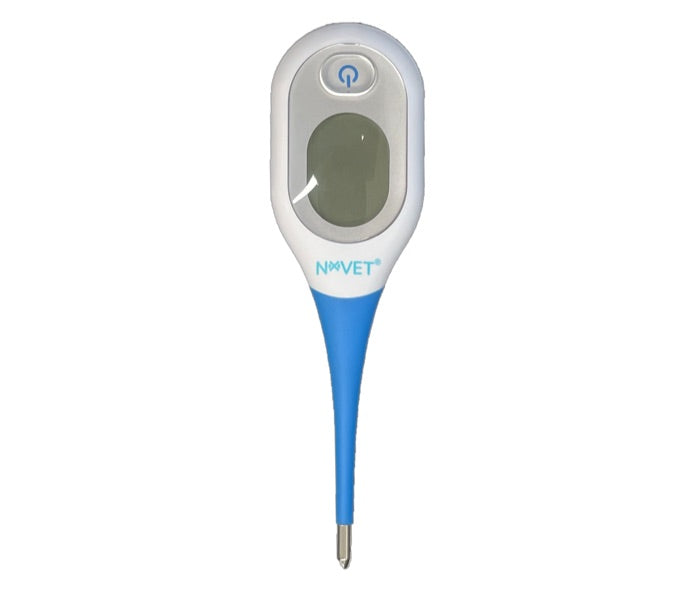
The NxTHERM digital thermometer
NxTHERM.
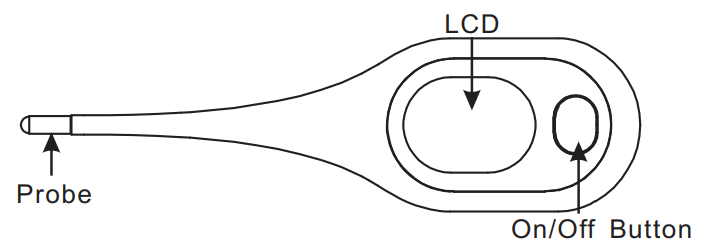
Diagram of NxTHERM: on/off button, LCD screen, probe tip
One on/off button, the LCD screen and the probe tip.
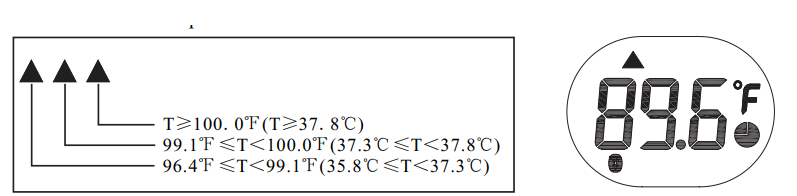
NxTHERM screen indicators: °C or °F, low battery icon, flashing dashes
°C or °F at the upper right, a low battery icon when the CR2032 needs replacing, flashing dashes (---) while measuring.

Take a reading

  1. Clean the probe (see cleaning below).
  2. Press On/Off.
  3. Place the probe at the measurement site and keep it still: movement causes errors and longer readings.
  4. While the dashes flash, wait. When they stop, it beeps (about 10 seconds) and shows the reading.
  5. Record the value. The unit usually powers off on its own.

Where to measure

NxTHERM is made for oral, rectal and underarm readings, not the ear. For stress free readings without rectal insertion, use the armpit (front leg against the chest wall) or the inguinal fold (inner thigh crease).

Underarm readings are less precise than core temperature: use them for fast screening and trends, and confirm critical decisions (hypothermia, hyperthermia) with your clinic's gold standard method.

Change the mode

NxTHERM mode icons: oral, rectal, underarm, bath
  1. Power on.
  2. While the mode shows, press and hold On/Off until it flashes.
  3. Press again to cycle through Oral, Rectal, Underarm (adjusted modes) and Bath (direct mode).
  4. Stop pressing and wait: it starts measuring.

For stress free pet readings, we suggest Underarm mode.

°C or °F, and memory

  • Switch °C and °F: with the thermometer off, press and hold On/Off for about 3 seconds. Check the symbol at the upper right.
  • Last 10 readings: power on; while the last reading shows, press and hold On/Off to enter memory mode. Press to cycle; long press about 3 seconds to exit.
Using NxTHERM with NxVET over Bluetooth

NxTHERM syncs through NxHUB or the NxVET Android or iOS app. Details are coming; email support@nx.vet for early access. If NxVET doesn't pick it up:

  • Check the battery (low battery icon, or it powers on inconsistently).
  • Stay within 1 to 10 m, ideally away from many other Bluetooth devices.
  • Take a new reading: some devices only send once a measurement is complete.
  • Force close and reopen the NxVET app; turn Bluetooth off and on.
Cleaning and disinfection
  • After each patient: wipe the probe and body with a clean soft cloth, then disinfect.
  • Low level (most practical): 70% medical alcohol on a soft cloth, wipe the probe 3 times, at least 1 minute each.
  • High level: immerse the probe in 0.55% OPA (for example CIDEX OPA) for at least 12 minutes at 68°F.
  • Don't: use strong solvents (benzene, paint thinner, gasoline), soak it for long in alcohol, OPA or water hotter than 50°C (122°F), or clean it with ultrasound.
Replace the battery (CR2032)
Diagram of opening the NxTHERM battery cover with a coin
  • Replace it when the low battery icon appears, or if it shuts down at random.
  • Turn the battery cover with a coin to open it.
  • Remove the old battery with a non metal tool, insert a new CR2032 positive side up, and turn the cover back to lock it.
Troubleshooting
  • A reading takes too long: high temperatures can take more than 15 seconds. Retest with good contact, less fur in the way and less movement.
  • "Err" or strange readings: remove the battery, wait 1 minute, put it back.
  • Out of range: below 32.0°C (89.6°F) or above 43.9°C (111.0°F) the device shows out of range. Retake with better contact and the patient at rest.
  • Calibration: done at the factory. No periodic readjustment is needed with normal use.
Specifications and safety
Measuring range32.0 to 43.9°C (89.6 to 111.0°F)
Accuracy (clinical band)±0.1°C / ±0.2°F
ModesOral, Rectal, Underarm, Bath
MemoryLast 10 readings
Battery1 × CR2032 (3.0 V)
Dimensions13.6 × 3.8 × 1.7 cm
Water resistanceIP27
ConnectivityBluetooth
  • Treat NxTHERM as a medical instrument: keep it away from chewing pets and small children (battery hazard).
  • On non rectal sites, use it for screening and trends unless your clinic SOP has validated it against core temperature.

Still stuck?

Tell us your device and what you see, and we'll help you get it working.
